Microsoft published a plugin called TokenEconomizer that watches coding agent sessions and tries to cut token use. Before I installed it, I read it. Read only, nothing run, checked against commit 85a8247 from November 1, 2026.
The short version
Safe with conditions. I did not install it. I took the idea and built two small pieces of my own.
What I looked at
A plugin like this is a set of hooks. Each hook runs on events in your session, which means it gets a look at what you type and what comes back. The questions that matter are the boring ones:
- What does it keep?
- Where does it keep it?
- What leaves the machine?
- Does anything scrub secrets on the way?
I started from its own privacy section, then checked the code against it.
What I found
Good news first. The project is careful in several places:
- All state is local, in one folder per repository.
- The folder is created private (0700) and its files 0600.
- The only things that leave the machine are model calls, and those go through your own agent CLI, not a service the plugin runs.
- Those model calls get digests: command templates, edited file names, and error lines with paths and numbers masked. Not file contents.
- The deny-list writer only removes rules it added itself, and refuses to write through a symlink that leaves the repository.
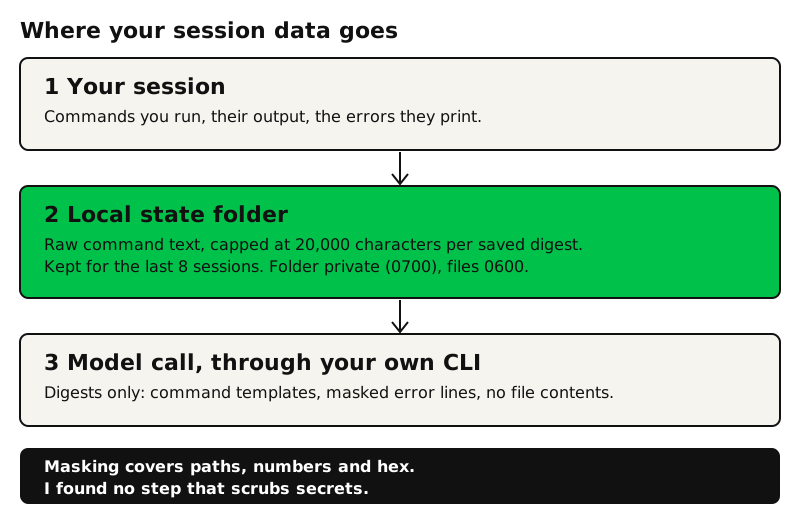
The condition: the folder on disk keeps raw command text for recent sessions, capped at 20,000 characters per saved digest, with the digests of the last eight sessions kept together. The masking in the code covers paths, numbers and hex values. It exists so two similar failures look the same, which is a grouping trick, not a privacy feature. I searched the plugin code and scripts for secret-shaped patterns (key prefixes, bearer tokens, password assignments) and found no step that scrubs them.
That is a smaller claim than my first note, which said stored commands and output were not redacted. Here is the accurate version: the data is local and locked down, but if a token appears in a command, it can sit in that folder, and nothing removes it first. Whether that matters depends on how you work. For me, secrets rarely appear in commands, but "rarely" is not a control.
Why I did not just install it
Locked-down files protect you from other users on the machine. They do not protect you from your own backups, your own sync tool, or a future version of the plugin that changes what it keeps. My rule for anything that watches sessions: check what it keeps before you check what it saves you.
What I took from it
Two ideas were worth having.
1. A repeat-failure nudge
When the same tool failure happens three times in one session, the agent is probably retrying variations instead of finding the cause. A small hook counts failures and, at three, adds one line: stop retrying, find the root cause. To count, it normalizes the first line of the error (paths, numbers and quoted values collapsed), hashes it with SHA-1, and keeps only the hash and a count. There is no error text on disk to leak. No model calls, no network, and it fails open, so a bug in the hook can never block your work. Temp files are swept after two days.
2. A lessons file that needs a yes
A durable fix, like "deploy with scp, not rsync", is worth writing down once. A small script turns it into one dated line for that repository's notes. It redacts secret-shaped text first, prints the line as a dry run, and writes nothing until I approve it. The agent can propose a lesson, but it cannot save one by itself.
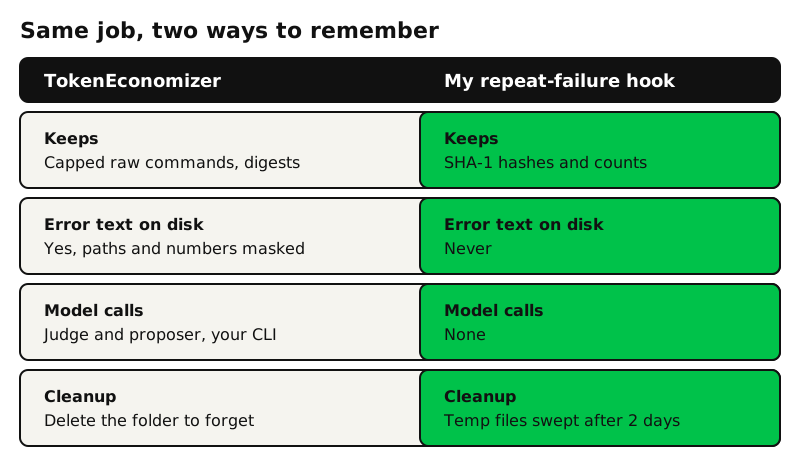
The redaction in my script is regex-based and catches common shapes only. I marked it that way in the code, with the upgrade path noted. A guard that claims more than it does is worse than none.
A checklist you can steal
Before you install a plugin that hooks into your agent:
- Read its privacy or state section, then confirm it in the code.
- Find out what it writes to disk and how long it keeps it.
- List what leaves the machine, and through which tool.
- Search for secret handling. If you find none, assume none.
- Look for what it can change in your settings, and whether it only removes what it added.
- Decide whether you need the plugin or just the idea.
Step 6 saved me the most. Both of my pieces are short scripts, and I control every line of them.
What I would check next
I have not run it, so I cannot say how much it saves in practice. The authors publish benchmark results, and that is a separate question from whether it is safe to run. If you try it, test it in a throwaway repository first, look inside the state folder after a session, and decide for yourself.