The problem: advice gets ignored
I can tell an agent "never print a password" in the rules file. Most of the time it listens. Once in a while a debugging command dumps a container config, and the secret lands in the transcript anyway.
The agent is not careless. It is helpful, and a command that shows everything is the fastest way to debug. I needed something that does not depend on the agent remembering.
The idea: a script on both sides of the tool call
A hook is a small program the agent runs for you at a moment you pick. Two moments matter here.
- Before the tool runs. The hook sees the exact command. It can stop it and tell the agent why.
- After the tool runs. The hook sees the output. It can withhold it if a secret slipped through.
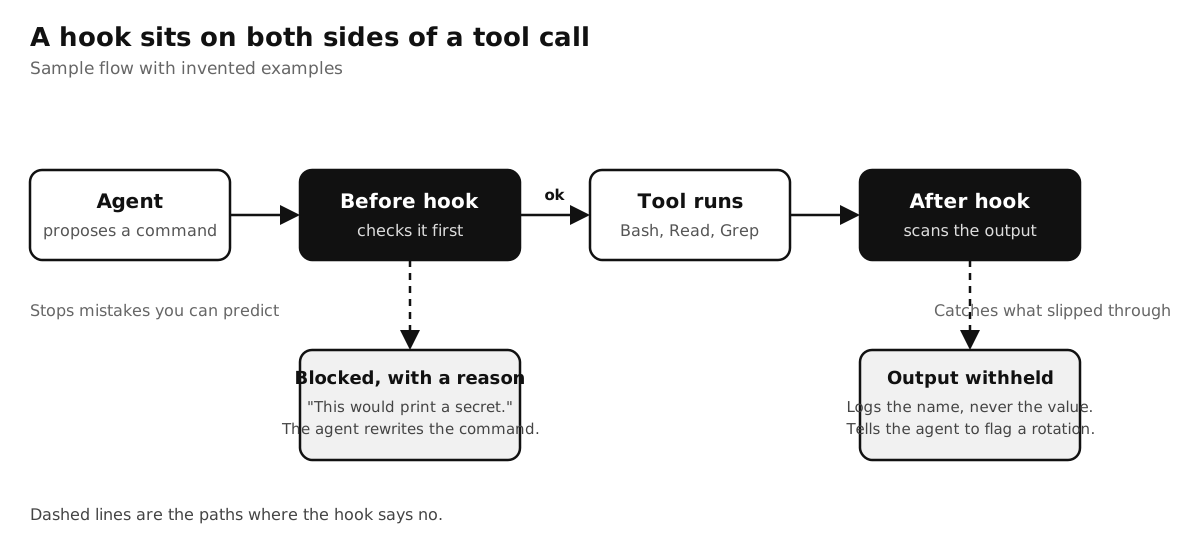
A worked example in three steps
1. Write the before hook
This is the whole thing, simplified. It reads the command, compares it to a short list, and says no with a reason.
// guard.js: runs before every Bash call
const input = JSON.parse(require("fs").readFileSync(0, "utf8"));
const cmd = input.tool_input?.command ?? "";

const risky = [
  /\bcat\s+\S*\.env\b/,      // print a secrets file
  /\bprintenv\b/,            // dump the environment
  /\bdocker\s+inspect\b/,    // container config holds env vars
];

if (risky.some((r) => r.test(cmd))) {
  console.error("Blocked: this would print a secret. Rewrite it so no value reaches the output.");
  process.exit(2);           // exit 2 = stop the call and show the agent the message
}
2. Wire it in
One entry in the settings file tells the agent to run it before every Bash call.
{
  "hooks": {
    "PreToolUse": [
      { "matcher": "Bash",
        "hooks": [{ "type": "command", "command": "node ~/.claude/hooks/guard.js" }] }
    ]
  }
}
3. Let the agent hit the wall
The agent tries to inspect a container to find one setting. The hook stops it and returns the message. The agent reads it and asks for just the field it needs. The secret never reaches the page, and I did not have to be there.
The after hook: catching what slips through
No list of patterns is complete. So a second hook reads the output after the tool runs and looks for the shapes secrets have: private key headers, token prefixes, password hashes, and name='value' assignments. On a hit it withholds the output and tells the agent to recommend rotating the credential.
The log keeps only the kind of thing that leaked, never the value. A log full of secrets would just be a second leak.
2026-10-12 09:14  BLOCK    prints a secret file
2026-10-12 09:16  BLOCK    reads values from a .env
2026-10-14 15:02  BLOCK    dumps container config
2026-10-15 11:40  EXPOSED  password hash in Bash output   (value not logged)
What my own log shows
After a few weeks the log had 72 entries. The biggest groups were reading values from an env file (22), printing a secret file (17) and dumping container config (13). A handful were real exposures that the after hook caught. Every one came from a helpful command, not a bad intention.
Not every hook needs to block. Another of mine only nudges: when the agent is about to read a large file in full, it adds a reminder to hand the reading to a free local model. Same mechanism, softer outcome.
Why not just write a better prompt?
- It is enforced. The agent does not get a vote. A prompt is read, weighed and sometimes lost in a long session.
- It gives a reason. The block message is context the agent can act on, so it adapts instead of stalling.
- It leaves a trail. The log shows which mistakes are common, so you know which rules to harden next.
Honest limits
- A hook only catches shapes it knows. A new token format or an odd command gets through until you add it.
- It can be wrong. Some safe commands match a pattern and get blocked. Keep the message clear so the fix is easy.
- It cannot judge intent. It sees text, not purpose, so it works as a seatbelt and not as a security boundary.
- The after hook runs once the tool has already read the secret. It protects the transcript, not the machine.
How to implement
- Pick the one mistake you never want repeated. Mine was a secret printed into a chat transcript.
- Write a script that reads the tool call from stdin, and exits with code 2 and a plain message when it matches.
- Register it in settings.json under PreToolUse with a matcher for the tools it should watch.
- Trigger it on purpose with a harmless test command and read the message the agent sees.
- Add an output scan under PostToolUse only after the first hook has earned its place.
Start with one hook for one mistake. When it blocks something real, you will know it paid for itself.